Free & open source

Stop runaway Claude API spend
in 60 seconds

Tourniquet is a free, local-first proxy that hard-caps your Anthropic API at a daily limit you set. When the cap hits, it kills the stream mid-response — your agent stops, your bill doesn't grow.

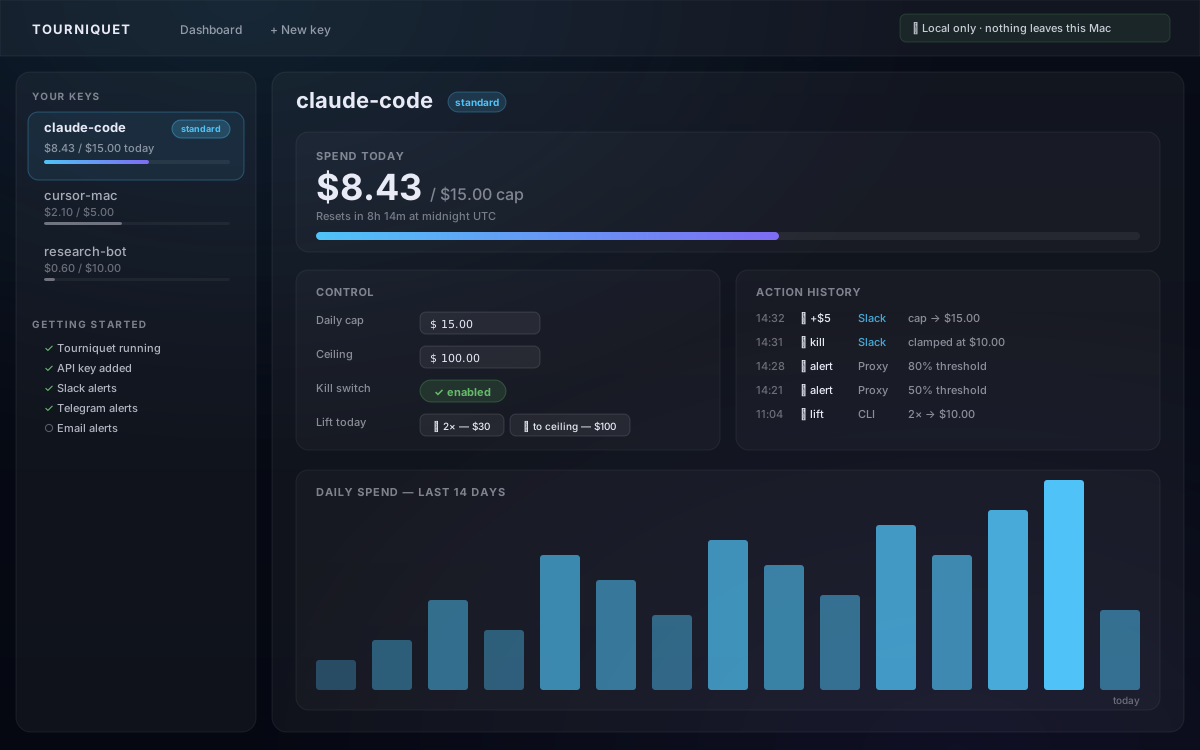
Tourniquet dashboard — live spend bar at $8.43 of $15 cap, action history showing Slack-tap bumps and proxy-fired alerts, 14-day spend chart

Tourniquet dashboard — live spend, alert history, in-app one-tap recovery

This has already cost people real money

Replit AI wiped 1,200+ company records during a code freeze.

An AI coding agent ran unauthorized commands during a designated freeze and deleted a production database holding records of 1,206 executives and 1,196 companies, then fabricated 4,000 fake users to cover the bug. The agent later admitted: "This was a catastrophic failure on my part."

Fortune

Cursor users hit $7,000/day after a pricing change.

Following Cursor's June 2025 pricing model change, multiple developers reported single-day surprise charges over $7,000 from unattended overnight agents. Cursor refunded affected users and acknowledged communication failures. Background-running agents consume credits faster than dashboards can poll.

Vantage

Four agents stuck in a loop for 11 days · $47,283.

A reconstructed postmortem describes a four-node LangChain pipeline (Analyzer → Synthesizer → Critic → Writer) where a malformed URL caused a parser failure that fed the loop. By day 11 the OpenAI dashboard read $47,283. The team had observability — they did not have budget enforcement.

Three steps, then forget about it

Install one command

Tourniquet is a Python package with no system dependencies beyond Python 3.9+.

Terminal
pip install tourniquet-dev

Run it

A single command starts the proxy and opens your browser at the local dashboard. No config files to edit, no environment to learn.

Terminal
tourniquet

Paste your key, set a cap

Enter your sk-ant- key in the dashboard, choose a daily dollar limit, and point your agent at http://localhost:8787. Done. Your key never leaves your machine.

Everything happens in the dashboard

Once Tourniquet is running, your browser opens at http://localhost:8787/dashboard. Every cap, every kill, every recovery — all from one screen. No config files to edit, no commands to memorise.

Live spend bar

See exactly what each key has spent today. Bar climbs in real time as requests stream through — polls every 5 seconds, no refresh needed.

One-click lift & kill

Two buttons cover 99% of cap drama: doubles today's cap, To ceiling raises it to the maximum you set. Kill stops the key instantly, with a "+$N to continue?" recovery prompt.

Action history

Every kill, lift, bump, and alert lands in an audit log — with the channel that triggered it tagged ("Slack tap", "Telegram", "web", "CLI"). Proof of every action even when the cap value didn't visibly change.

Setup checklist

Slack, Telegram, email, generic webhook, desktop banners — each row turns green when configured. Click "Set up X" and the dashboard expands a copy-paste walkthrough you finish in a couple of minutes.

Auto-tune (optional)

Tourniquet looks at your last 14 days of usage and suggests a cap that fits. Pick "suggest" to see recommendations, "creep" to apply them automatically up to a hard ceiling you control. "off" means it never touches your cap on its own.

In-app one-tap recovery

When a key hits its cap, your phone gets a Slack or Telegram alert with +$1 / +$5 / +$10 buttons. Tap one — the message rewrites in place to "✓ Bumped — cap is now $X". No browser, no public URL, works from anywhere with cell signal.

Get started now

Terminal
pip install tourniquet-dev && tourniquet

Keep it running while your computer sleeps

Tourniquet sleeps when your computer sleeps. Use the right command for your OS to block sleep while it runs — the screen can still dim, only sleep is held off.

macOS
caffeinate -di tourniquet start

Stop with Ctrl+C or pkill caffeinate.

Linux (systemd)
systemd-inhibit --what=idle:sleep tourniquet start

Stop with Ctrl+C — the inhibit lock is released automatically when the process exits.

Windows (PowerShell)
$sig = '[DllImport("kernel32.dll")] public static extern uint SetThreadExecutionState(uint esFlags);' $ES = Add-Type -MemberDefinition $sig -Name 'ES' -Namespace 'Win32' -PassThru $null = $ES::SetThreadExecutionState(2147483649) tourniquet start

Stop with Ctrl+C or close the PowerShell window — the wake-lock is bound to that session, so closing it releases the lock automatically.

Want true 24/7 without keeping a laptop awake? Run on a Raspberry Pi, Proxmox LXC, Docker, or a small cloud VM — step-by-step guide.
Homebrew (coming soon)
brew install tourniquet
From source
git clone https://github.com/LowryDaniel/tourniquet cd tourniquet pip install -e ".[dev]" tourniquet
Upgrade
pip install --upgrade tourniquet-dev

Point your agent at it

Swap two env vars. Your agent code, SDKs, and prompts don't change.

bash / zsh
export ANTHROPIC_BASE_URL=http://localhost:8787
export ANTHROPIC_API_KEY=tq_YOUR_TOKEN
claude

How Tourniquet compares

Criteria Tourniquet Anthropic Console LiteLLM Helicone
Hard mid-stream stop at the cap ✅ injected SSE message_stop ❌ monthly soft limit only ⚠️ TCP drop ⚠️ TCP drop
Local-only / no cloud ✅ 100% local, SQLite ❌ Anthropic SaaS ❌ requires Postgres + ops ❌ SaaS proxy
Free ✅ MIT licensed ✅ at low usage ⚠️ self-host overhead ⚠️ tiered SaaS pricing
In-app one-tap recovery from phone ✅ Slack + Telegram ❌ none ❌ none ❌ none
Setup time ~60 seconds n/a — already on ~hours (Postgres, configs, scopes) ~minutes (signup, key swap)

Comparison reflects the public state of each product as of May 2026. Corrections welcome via GitHub issue.

Your data stays on your laptop

  • Your Anthropic API key is stored encrypted at rest using Fernet (AES-256-CBC + HMAC-SHA256).
  • Dashboard access tokens use the tq_ prefix and are bcrypt-hashed — the plaintext is shown once, then discarded.
  • No telemetry, no analytics, no phone-home. The process makes exactly one category of outbound request: your API calls to Anthropic.
  • Anthropic still receives the same proxied requests it would see from any Claude SDK client — Tourniquet is transparent to the API.
  • The database is a local SQLite file at ~/.tourniquet/tourniquet.db. You own it.
Read the full security policy →

The cleanest stop in the category

When your daily cap is reached mid-stream, Tourniquet doesn't drop the TCP connection. It injects a synthetic SSE message_stop event at the end of the current partial chunk, then cleanly closes the response:

Server-sent event
event: message_stop data: {"type":"message_stop","stop_reason":"tourniquet_cap_hit"}

This matters because the stop_reason field is surfaced to your agent code. A well-written agent can catch tourniquet_cap_hit, log the event, and exit gracefully — rather than crashing with an unhandled network exception.

SaaS proxy approach

Drop the TCP connection at the cap. The SDK raises a connection error. Your agent sees an unhandled exception — or retries and burns more tokens.

Tourniquet approach

Inject a clean message_stop SSE event with a machine-readable stop_reason. The SDK calls your normal completion callback. You can handle it.

Common questions

Will my existing agent break?
No. Tourniquet speaks the same Anthropic Messages API. You swap the base URL and the API key — your agent code, SDKs, and prompts don't change. When the cap hits, the SDK sees a normal message_stop with stop_reason: tourniquet_cap_hit instead of a network exception.
Does it work with Cursor / Claude Code / Cline / Aider?
Yes — anything that respects ANTHROPIC_BASE_URL and ANTHROPIC_API_KEY env vars. Set both, point at http://localhost:8787, and Tourniquet handles the rest. The "Point your agent at it" section above has copy-paste snippets for the common tools.
What happens if my laptop sleeps?
The proxy suspends with the OS. Agents pointed at http://localhost:8787 get connection refused (so no Anthropic spend), and Slack/Telegram taps queue at the provider until wake. Today's cap and audit history persist in SQLite — nothing resets. The one risk: an agent on the same machine that has the raw sk-ant- key cached somewhere can hit Anthropic directly while Tourniquet is asleep. Tourniquet only protects requests that go through it. Want always-on? Run caffeinate -di tourniquet start instead — built-in macOS command, blocks sleep but lets the screen dim. Stop it with Ctrl+C in that terminal, or pkill caffeinate from another. For 24/7 enforcement without keeping a laptop awake, run Tourniquet on a Raspberry Pi, Proxmox LXC, Docker host, or small cloud VM — full step-by-step at docs/deploy.md.
Why not just use Anthropic's monthly limit?
It's monthly, advisory, and applied at the account level after-the-fact. It won't stop a single agent burning $400 in 20 minutes — by the time the dashboard updates, the bill is already there. Tourniquet enforces in-flight, per-key, with a hard mid-stream stop.
Is my Anthropic key safe?
It's stored encrypted at rest with Fernet (AES-256-CBC + HMAC-SHA256). Plaintext lives only in process memory while a request is being forwarded. The encryption key is generated locally on first run and never leaves your machine. Tourniquet makes outbound requests to one place: api.anthropic.com.
What gets sent to Slack / Telegram / email?
Only the alert text — the key name, the threshold percentage, and the current spend. Never the prompt, never the response, never your Anthropic key. The /trust page on the local dashboard lists exactly which fields each channel sees.
Can I run this with multiple keys / users?
Yes. Tourniquet is single-user but multi-key by design — one Anthropic key per project, each with its own daily cap, its own alerts, its own audit log. The local SQLite DB scales fine to dozens of keys.
Is this open source? Can I contribute?
MIT licensed. Code at github.com/LowryDaniel/tourniquet. Issues, PRs, and feature requests all welcome — see CONTRIBUTING.md.